
In Anki desktop
With the add-on, Notosaurus runs inside Anki desktop: it starts with Anki, stops with it, and writes the cards straight into the profile that is open.
The Tools → Notosaurus menu
Section titled “The Tools → Notosaurus menu”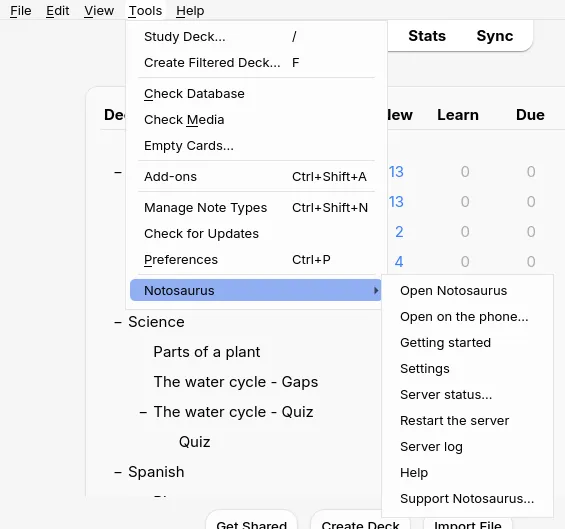
- Open Notosaurus opens Notosaurus in the computer’s browser.
- Open on the phone… shows a QR code to open Notosaurus on the phone, and the three steps to get there (see On the phone).
- Getting started opens the setup assistant: the AI and its key, then the phone (see Getting started with the add-on). The first time, Anki offers it by itself when no AI is set up yet.
- Settings opens the settings (AI service and key, voices, children…) in the computer’s browser. They only open on the computer: the phone can’t change them.
- Server status… says whether Notosaurus is running, its addresses (on the phone and on this computer), and where its files and your lessons are.
- Restart the server stops and starts Notosaurus again: after changing the add-on’s configuration, or when something is stuck.
- Server log shows what Notosaurus did lately. It is the first thing to look at when something goes wrong (see Troubleshooting the add-on).
- Help opens this documentation, in Anki’s language.
- Support Notosaurus… opens its Ko-fi page, to make a donation if you like it. Notosaurus stays free.
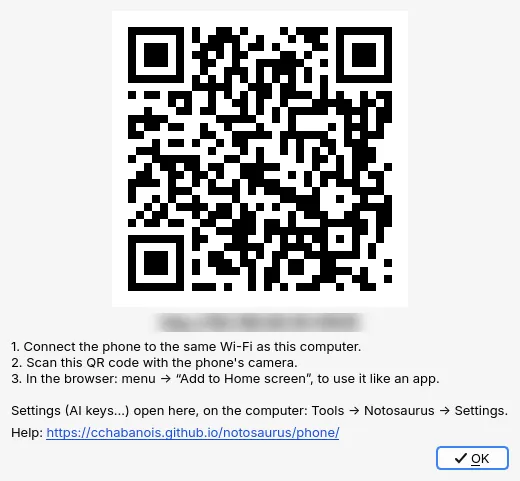
Switching profiles in Anki keeps Notosaurus running: the cards then go into the profile that is open (see Several children).
The add-on’s configuration
Section titled “The add-on’s configuration”A few technical options are in Tools → Add-ons, select Notosaurus, then Config:
autostart: start Notosaurus with Anki (trueby default). Withfalse, it starts the first time you use the menu.host:0.0.0.0(by default) lets the phone reach Notosaurus on the same Wi-Fi;127.0.0.1keeps it to this computer only.port:8000by default. Change it if another program already uses that port.source,python,data: leave them empty. They are only for developing Notosaurus.
After a change: Tools → Notosaurus → Restart the server.
The decks Notosaurus makes and what its cards look like in Anki, on the computer and the phones: see The cards in Anki.